Bills, found — not typed in.
Hyplr finds your bills in Gmail, Apple Mail and the PDFs on your Mac — the amount, the due date and who it’s from — and shows each one when it’s time to pay.
Found, not typed
With a reminder app, you type each bill in. Hyplr reads the ones you already have: the email “Your bill is ready”, the invoice in Downloads, the screenshot of a bill.
One bill, one card
The email and its PDF are one bill, not two. Hyplr shows how it linked them: invoice no. 4471 · $184.00 · same sender.
When it’s due
A bill waits in Soon until 3 days before it’s due, then moves to Now. It turns red only in the last 48 hours — and the one daily notification counts it the day before and on the day.
Paid, with the proof
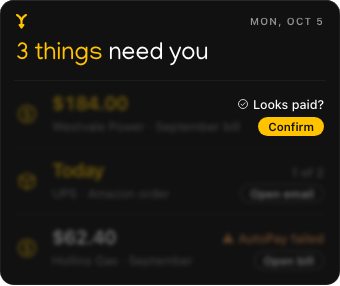
When the payment email arrives, Hyplr asks: “Looks paid?” Confirm, and the bill closes with the proof kept. Every close can be brought back.
Every supplier, with its history
The Map lists every supplier with its bills, payments and documents — and twelve months of bills at a glance.
Careful with money
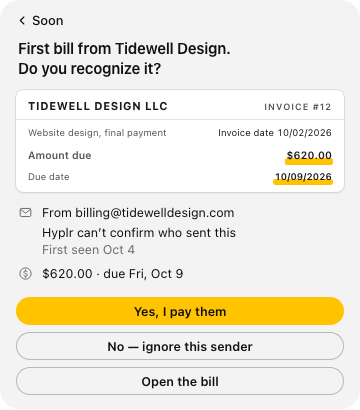
- A first bill from someone new waits for one click.
- Bills on AutoPay show as paid automatically; a failed AutoPay becomes a bill to pay, marked “AutoPay failed”.
- A bill already overdue when Hyplr found it is never red — Hyplr asks instead of guessing.
What Hyplr doesn’t do
It doesn’t pay bills or see your bank. It doesn’t send email or open links found in it. It reads Gmail and the accounts in Apple Mail — not Outlook on the web or other mail apps.
Questions
What happens to bills from before Hyplr?
A bill that was already more than a week overdue when Hyplr first saw it, with no payment found, is never shown in red. Hyplr can’t see your bank, so it asks: paid already, or not paid yet?
Can Hyplr close a bill I haven’t paid?
Not by itself: when a payment email arrives, Hyplr asks if the bill is paid. Every close has Bring back.
Hyplr is coming to the Mac.
For Macs with Apple silicon and Apple Intelligence, on macOS Tahoe 26 or later.